 FloServer
PHP
Settings → PHP: the defaults for every project and shared sites on one PHP version.
Extensions
Pick the PHP version at the top right, then tick the extensions you want. Find one by name with the search box. opcache is always on.
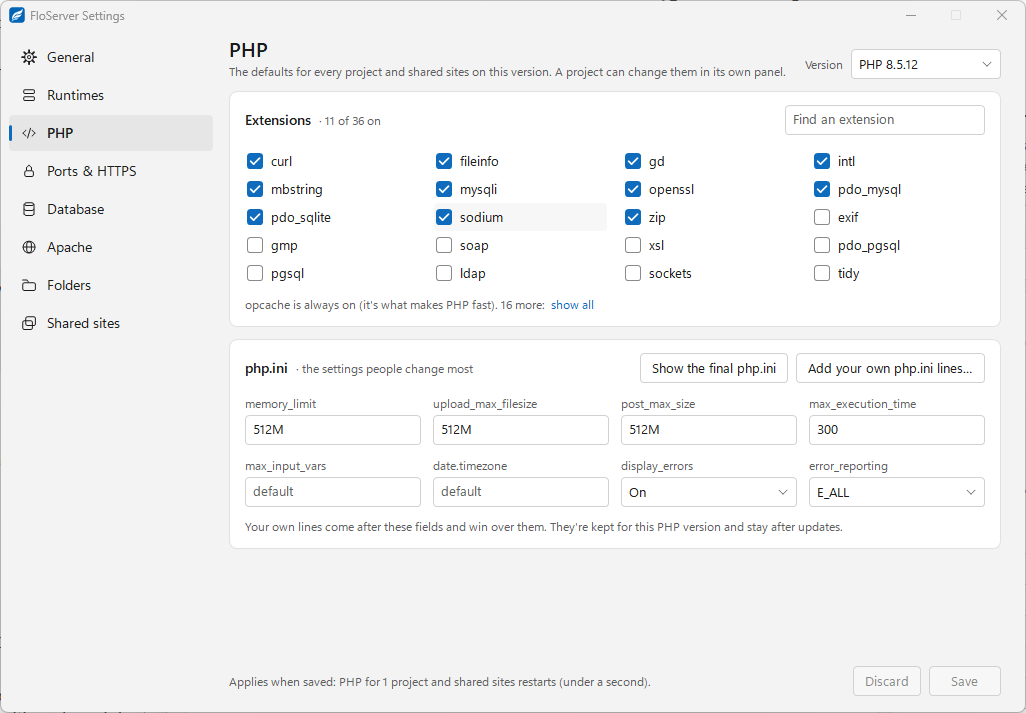
php.ini
The settings people change most have their own fields: memory_limit, upload_max_filesize, post_max_size, max_execution_time, max_input_vars, date.timezone, display_errors and error_reporting.
- Add your own php.ini lines… for anything else. Your lines come after the fields and win over them. They’re kept for this PHP version and stay after updates.
- Show the final php.ini shows the result.
Saving
Changes apply when you click Save. PHP restarts for the projects on that version in under a second.
A project can change these for itself in its PHP tab. From the terminal: flo php 8.5 ext intl on, flo php 8.5 ini memory_limit 1G.
Docs for FloServer 0.1.0Something wrong on this page? Email us