 FloServer
Apache
Settings → Apache: the shared Apache that serves projects using .htaccess, behind nginx.
Modules
Turn Apache’s modules on or off, and find one by name. Ticked grey ones are FloServer’s own: its config needs them, so they stay on. Grey empty ones don’t apply behind nginx.
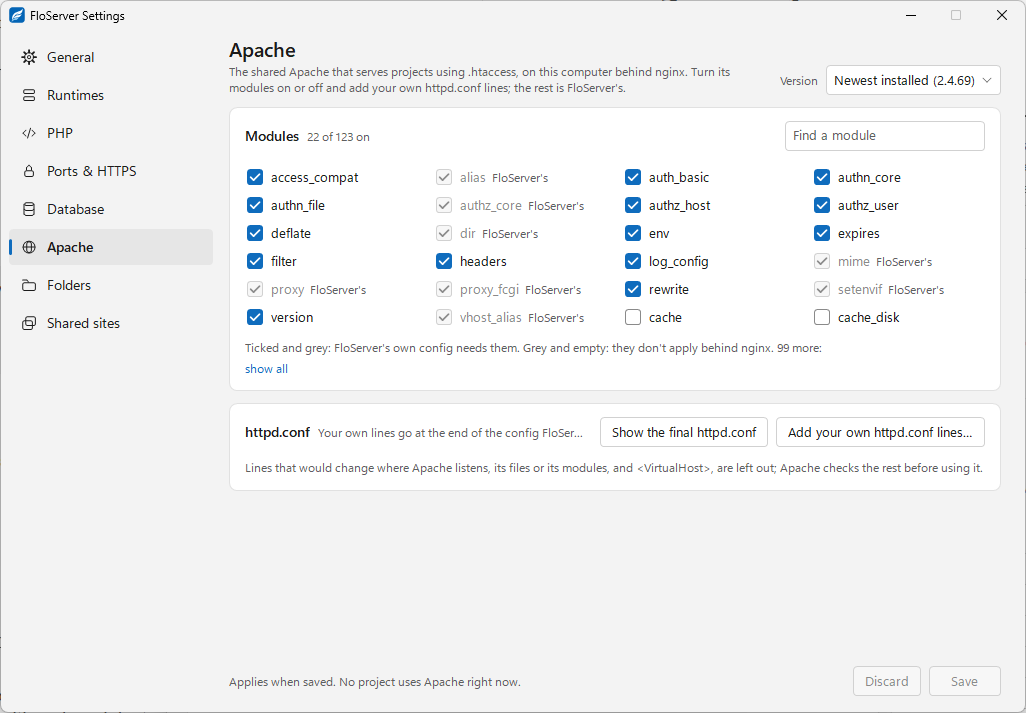
httpd.conf
Add your own httpd.conf lines… adds lines at the end of the config FloServer makes. Lines that would change where Apache listens, its files or modules, and <VirtualHost>, are left out; Apache checks the rest before using it. Show the final httpd.conf shows the result.
Changes apply when you click Save.
Who uses Apache
A project uses Apache when its web server is set to Apache, in its panel or its floserver.json ("web": "apache"). Shared sites can use it too.
Docs for FloServer 0.1.0Something wrong on this page? Email us